

WhatsApp is rolling out a feature on Android that will display thumbnails of photos, videos, and stickers in the chat list. Let’s find out the details together.


WhatsApp has launched a new feature on Android designed to make it easier to identify the latest content you’ve received in a conversation. In Beta version 2.26.32.11, the application started showing The small thumbnail next to the content type indicator Directly in the chat list. This way, you’ll no longer have to enter a conversation to find out which photo, video, or sticker was recently shared.
Currently, when the last message in a conversation is multimedia, WhatsApp shows only general description. This system allows you to know the type of message, but not the specific content that was sent. It is here that the new feature intervenes.
How does this new feature of WhatsApp work?
When the last message was a photo, a photo will appear in the conversation list Small preview of imagewhile still retaining the tag that identifies the content as a photo.
WhatsApp prepares new chat themes: animated wallpapers also available on iPhone


The same mechanism works for videosthe thumbnail is placed next to instructions related to the movie. The function is Also extends to stickersallowing you to quickly identify which sticker you received without opening a chat.
Where WhatsApp is headed
This innovation follows the direction WhatsApp has already taken with other changes to the conversation screen. Previously, the platform also launched Leave a message as a draftdisplays a special label in the chat list when a user starts composing a message without sending it.

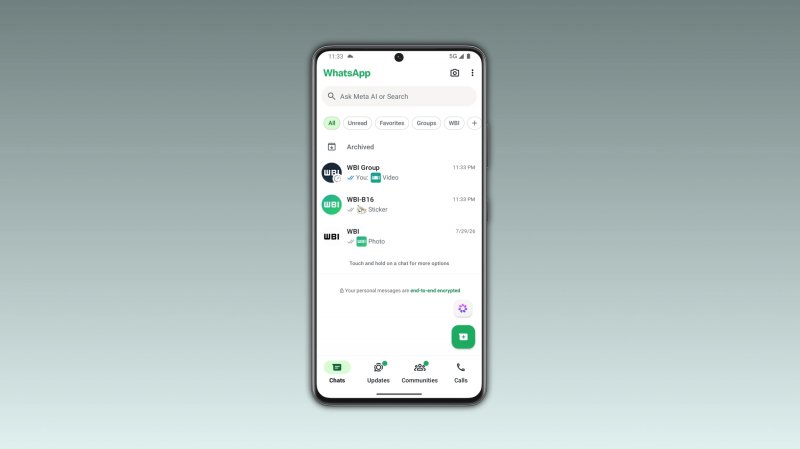
Media preview is currently available Only available to select Android beta testers And the distribution work is gradually underway. WhatsApp expects to roll out the feature to more users in the coming weeks, but for now No specific date for general availability has been announced yet. What do you think? Do you think this is a useful feature to improve user experience?