
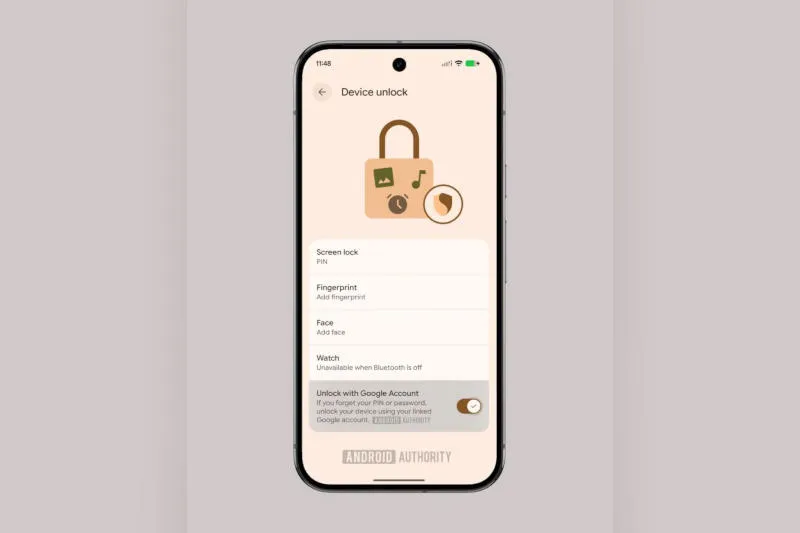
The fifth beta of the Android 17 QPR2 update has a new feature – users who have forgotten the PIN, password or pattern on their smartphone will be able to unlock the device through their Google account. The corresponding option has appeared in the settings, send Android Authority.
Image source: androidauthority.com
Users of Android devices sometimes set passwords, PINs, or lock keys that are too complex to unlock. In Android 4.4 and lower, Google allows you to reset the account through the account mode on its system. With the release of Android 5.0 Lollipop, this feature disappeared and users had to reset their device to factory settings. When the Android 5.1 Lollipop update arrived, it also released Factory Reset Protection (FRP), eliminating a vulnerability where the device could be stolen, wiped of all data, and sold as a new device. FRP requires verification of device ownership through a Google account, but only if the data has been deleted – even the legitimate owner will lose any information that is not synced with the cloud.
Now, in one of the future Android updates, developers will roll out the “Unlock with Google Account” feature. The corresponding options appear in the Device Unlock section of the preliminary version of Android 17 QPR2—you can configure PINs, passwords, patterns, and biometric access in the same place. “If you forget your PIN or password, use your linked Google Account to unlock your device.”read the feature description.
An attacker could be at risk of gaining access to your device, Google Account, and password, so users who are concerned about privacy and security should probably opt out of this option – as long as they don’t forget their PIN or password. While the feature is not active even in the preview version of the Android update, there is no time frame for it to be deployed to the public version of the system – if that does happen.
If you find an error, select it with your mouse and press CTRL+ENTER.