

A cybersecurity researcher named NightmareEclipse, who frequently discloses information about zero-day vulnerabilities in Microsoft products, has discovered a new way to interfere with Microsoft Defender antivirus software – he blocks the ability to automatically update the program.

Image source: BoliviaInteligente / unsplash.com
Experts introduced the concept of the vulnerability, which they named BigDiskBuster – a tool that blocks the installation of Microsoft Defender antivirus software modules and updates to the signature database. “I’ve created an interesting tool here – it completely blocks Defender updates, so while the utility is running in the background, you still keep the current version of the program.”he wrote. According to him, BigDiskBuster is equivalent to the previously released UnDefend utility; the vulnerability applies to all supported Windows versions, although its current variant “The function is buggy and needs to be improved”.

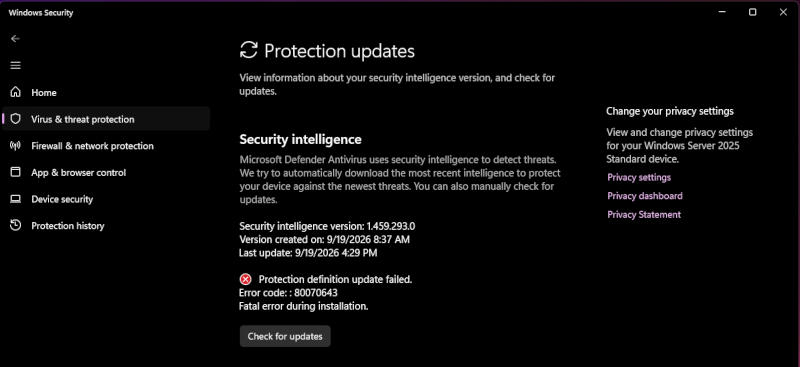
Image source: github.com/MSNightmare
The mechanism does not shut down Defender completely. The utility waits for the update process to begin and then attempts to fill the disk with data so that there is not enough free space to complete the installation. To do this, temporary hidden files are created and, if necessary, additional threads are started to capture more space. Once Microsoft Defender encounters an update failure, the archive will be closed and free space will be released. In addition, BigDiskBuster opens the Microsoft Malicious Software Removal Tool executable file MRT.exe and prevents other processes from accessing the file while its handle is open. Therefore, Defender still uses the current version of the software modules and signature database while the utility is running.
Experts have attached a screenshot, according to which the antivirus update ends with error 0x80070643 – a standard installation error that by itself does not prove that the BigDiskBuster utility was the cause of the failure. Antivirus software that runs with an outdated database is highly undesirable: it continues to run but loses the ability to identify recently discovered malware. Previously, NightmareEclipse talked about more dangerous Windows vulnerabilities; the new vulnerability prevents one of the basic functions of antivirus software – automatic updates. Independent experts have not confirmed BigDiskBuster’s capabilities.
If you find an error, select it with your mouse and press CTRL+ENTER.