

AMD declare A specialized agent-based artificial intelligence tool called Ross: an interactive assistant designed to simplify the creation of a variety of embedded systems. Ross is said to have covered the entire development process – from printed circuit board design, circuit analysis and debugging to optimization, writing associated software and deployment.
Unlike regular chatbots and programming assistants, Ross Deeply integrated into the AMD ecosystem. Using natural language queries, developers can search files and tools, execute commands, implement proven workflows, and more, and Ross gives teams the flexibility to use their preferred large language model (LLM) and integrated development environment (IDE).

Image source: AMD
One of the building blocks of Ross is a professional knowledge base. It contains user manuals, product descriptions, white papers, application notes, and more. Information can be accessed via the cloud or locally.
In addition, developers can use AI agent skills: these are open, professionally prepared Markdown files containing proven, reusable techniques for solving common design problems. These skills help large language models step through complex workflows, such as optimizing circuit timing or rebuilding C++ code to improve performance in a Vitis HLS environment.

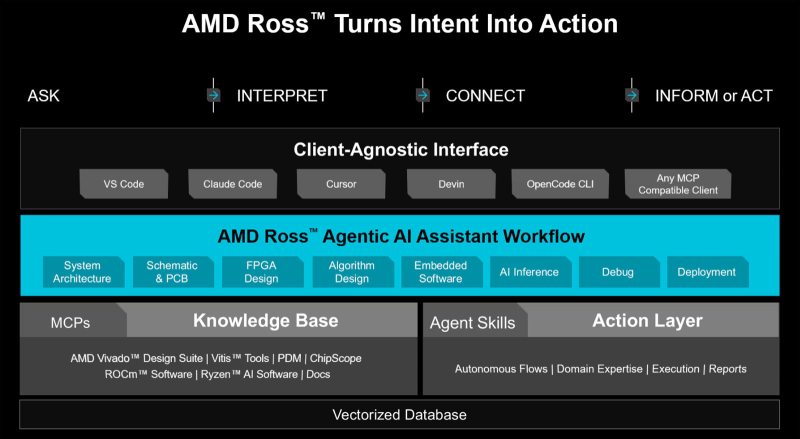
Examples of completed projects will help you understand how to use agent skills in real embedded systems. Other capabilities of Ross include the ability to optimize microcircuit designs, create necessary software, estimate power consumption, and more.
Overall, as highlighted, Ross is more than just an artificial intelligence programming assistant on top of standard development tools. The new assistant combines AMD embedded tools, expertise and pre-built workflows into a single interface. Ross offers contextual suggestions and automation capabilities that standard AI assistants cannot.
source: