

There is less than a month left before the release of the ambitious strategy Warhammer 40,000: Dawn of War 4, and developers from the German studio King Art Games, with the support of publisher Deep Silver, decided to help players prepare for the landing on Kronus.

Image source: Deep Silver
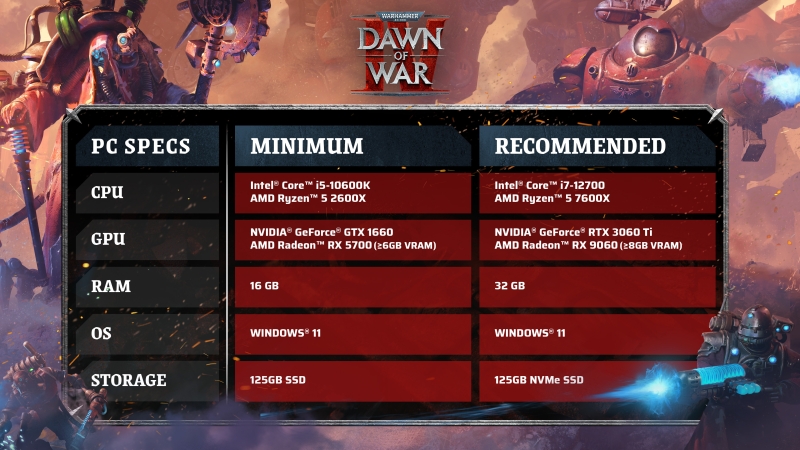
According to King Art Games, release day is fast approaching and “it’s time to prepare your machines for the battle ahead.” Studio presented Warhammer 40,000: Dawn of War 4 system requirements.
As it became known, to run Warhammer 40,000: Dawn of War 4 on a PC you will need an Intel Core i5-10600K processor, an Nvidia GeForce GTX 1660 video card, 16 GB of RAM and a solid-state drive (SSD).
Warhammer 40,000: Dawn of War 4 system requirements are presented below:
Minimum Requirements
OS: Windows 11 (64 bit); processor: Intel Core i5-10600K or AMD Ryzen 5 2600X; video card: Nvidia GeForce GTX 1660 or AMD Radeon RX 5700; video memory: 6 GB; RAM: 16 GB; SSD space: 125 GB.
Recommended Requirements
OS: Windows 11 (64 bit); processor: Intel Core i7-12700 or AMD Ryzen 5 7600X; video card: Nvidia GeForce RTX 3060 Ti or AMD Radeon RX 9060; video memory: 8 GB; RAM: 32 GB; SSD space: 125 GB.
The story of Dawn of War 4 begins centuries after the events of Dark Crusade. The planet Kronus became the arena of irreconcilable confrontation between four factions – the orcs, the Adeptus Mechanicus, the necrons and the space marines.
They promise an epic story from Black Library author John French, four full-fledged campaigns with 70 missions, co-op, multiplayer with 30 maps at launch, Skirmish and Last Stand modes, as well as a translation into Russian.
Warhammer 40,000: Dawn of War 4 will be released on December 3rd Steambut Premium Edition buyers will receive the game on November 30th. Along with the full release, the game will also will appear in the GeForce Now cloud service.
If you notice an error, select it with the mouse and press CTRL+ENTER.