

For people who suffer from motion sickness, reading messages or watching videos while traveling in a car can quickly become an unpleasant experience. The problem lies in the contrast between what the eyes perceive when they are stationary on the screen and what the inner ear perceives when the vehicle accelerates, brakes or turns.
To alleviate this problem, Google has now launched Android 17 A solution called Motion Assistvery similar to the Motion Cues launched by Apple in 2024 and later followed by other manufacturers such as Oppo and Vivo. However, distribution seems destined to be gradual and, at least initially, should only involve a few Pixel smartphones.
How Google Motion Assist works
The technology uses the smartphone’s built-in accelerometer and gyroscope to detect vehicle motion. Then the system displays a series of points along the edge of the screenmaking them move based on what’s happening on the journey.

For example, when the car turns right, the indicator light moves to the left. During braking, they slide toward the front of the screen. The goal is to provide eyes Visual reference consistent with body-perceived movementthereby reducing conflicts that may lead to feelings of nausea.
Google Play, Android stores are getting ready to recognize apps that start with images through Ask Play


So it’s not just a graphic effect. Indicator changes are calculated in real time Use your device’s sensors and follow the vehicle’s sensors. Apple already uses a similar principle in Motion Cues, a feature that has been shown to significantly reduce symptoms of motion sickness when using mobile devices.
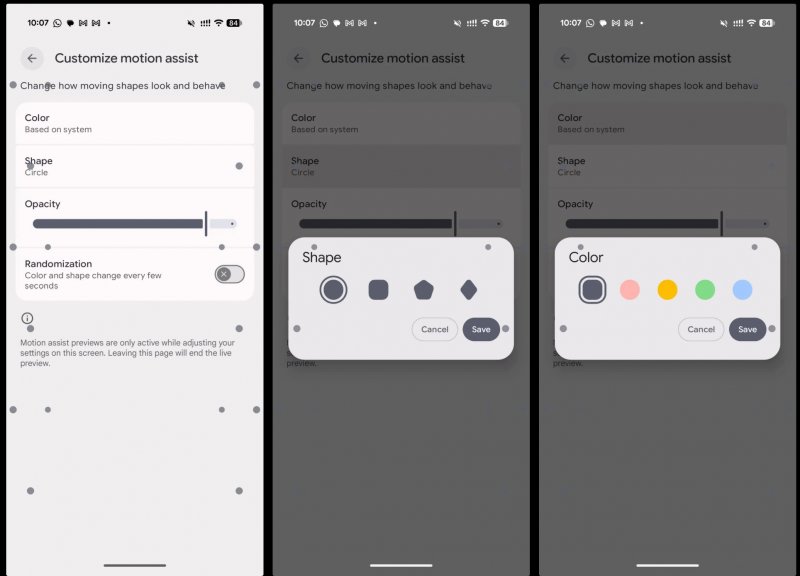
Google also allows you Customize how motion assist works. You can change the indicator’s opacity and choose between different shapes and colors. The system can be configured to activate automatically when a smartphone is detected in a moving vehicle, or it can be activated manually via a special command in Quick Settings.
The feature’s rollout doesn’t appear to be complete yet. Some Pixels have started receiving itwhich is not yet available on other devices in the same series. When it arrives on your compatible device, Sports Assist should be accessible from the section of your Google Account settings dedicated to all services.