

Brave browser now has a helpful tool Function – Fake email addresses. Browser users do not need to provide their real address to register on the Site and Services.

Photo credit: Rubaitul Azad/unsplash.com
To use the new features, you must create a Brave account and provide your real email address when registering. Next, after logging into your account, a tooltip will appear asking you to use a fake address when you click on the email field during the registration process – if it doesn’t appear, you can right-click on the field and select the appropriate option. When filling out the form on the website, a virtual address will be inserted and all correspondence received at this address will be forwarded to the main mailbox.

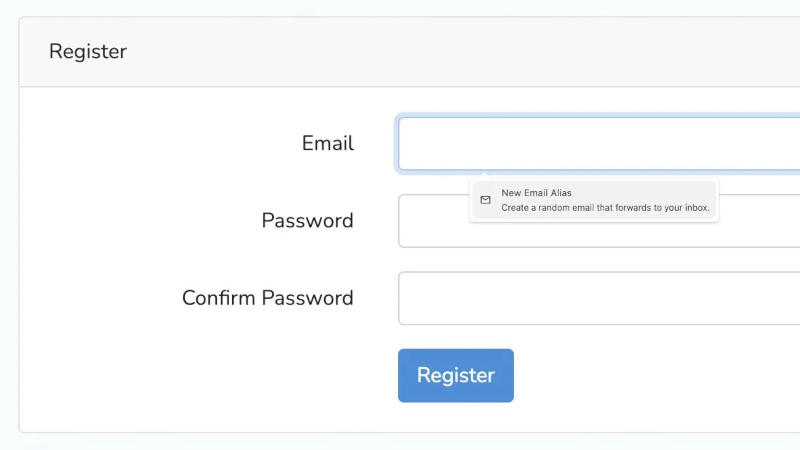
Image source: brave.com
Brave says the feature is designed to protect user privacy – email addresses can be used as personal identifiers to display targeted ads. Tech giants can build user profiles based on this information to track browsing and purchases. If the website is hacked, the account information may become prey for hackers or enter the data broker’s database. Brave guarantees that letters sent to false addresses will not be read – they are only processed to filter spam and viruses. Once forwarded, browser developers delete these emails from their servers.
All material in a Brave account remains encrypted without request, and any comments added to a virtual address are stored locally on the device unless sync is enabled – when sync is active, comments are protected by end-to-end encryption. Since the feature is still new, some forwarded emails may end up in spam folders initially, but soon the browser’s email service will earn a reputation for reliability and this effect won’t happen as frequently. All Brave users can access up to five virtual addresses; Premium subscribers will be able to select a larger number in the future.
If you find an error, select it with your mouse and press CTRL+ENTER.