
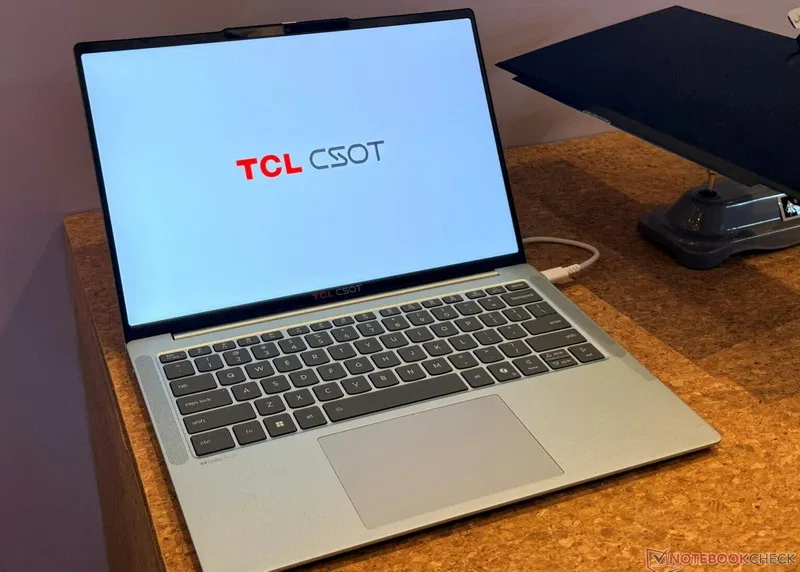
At DTC 2026, TCL CSOT unveiled a new 14-inch laptop display that claims to consume less than 1W of power. The panel was installed in a device similar to a Lenovo Yoga Pro laptop. Despite its extremely low power consumption, the display supports an adaptive refresh rate of up to 120Hz.
Image source: Notebookcheck
According to TCL CSOT, the display adopts a high light transmittance design to improve backlight efficiency. The company classifies this panel as a “milliwatt-class” solution: the power consumption of the entire liquid crystal module (LCM) does not exceed 1 W. By comparison, regular 14-inch IPS laptop screens consume between 3 and 4.5 W, while higher resolution models with higher refresh rates often consume more than 8 W.
The prototype display has a resolution of 1920 × 1200 pixels and supports an adaptive refresh rate of up to 120 Hz. TCL CSOT did not provide official brightness data, but a company representative told NotebookCheck that the figure ranges from 300 to 400 cd/m2.
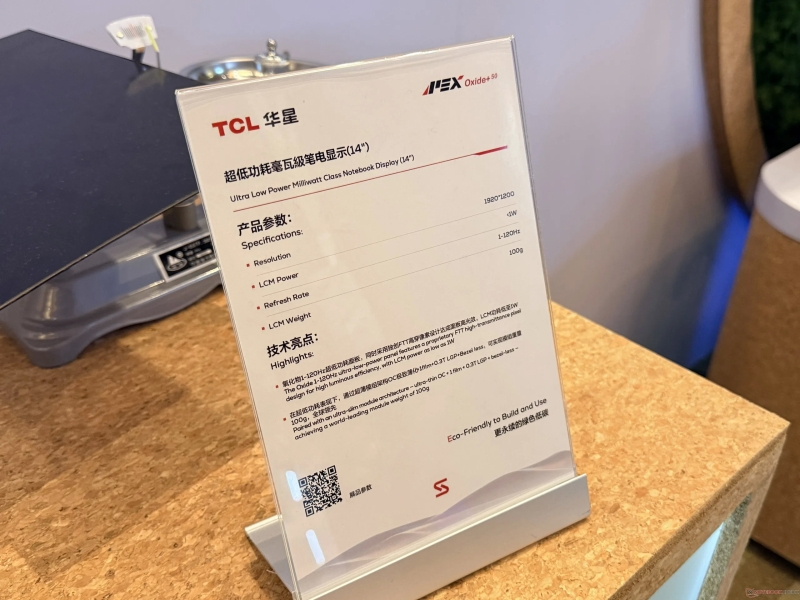
Another feature of the display is its weight. According to the company, the entire display module weighs just 100 grams, while standard 14-inch IPS panels typically weigh between 250 and 350 grams. The prototype shown uses an ultra-thin panel design designed for laptops with reduced chassis thickness.
Reducing display power consumption can help improve battery life in laptops. However, TCL CSOT has not yet provided complete system-wide power consumption data or battery life comparison results. It is also not yet known whether the Lenovo Yoga Pro case used in the demonstration is a prototype of a future commercial model or whether it was taken solely for demonstration.
TCL CSOT has not yet announced when exactly mass production of such a display will begin. There are suggestions about a possible entry into the market in 2027, but the exact timing has not yet been determined.
If you notice an error, select it with the mouse and press CTRL+ENTER.