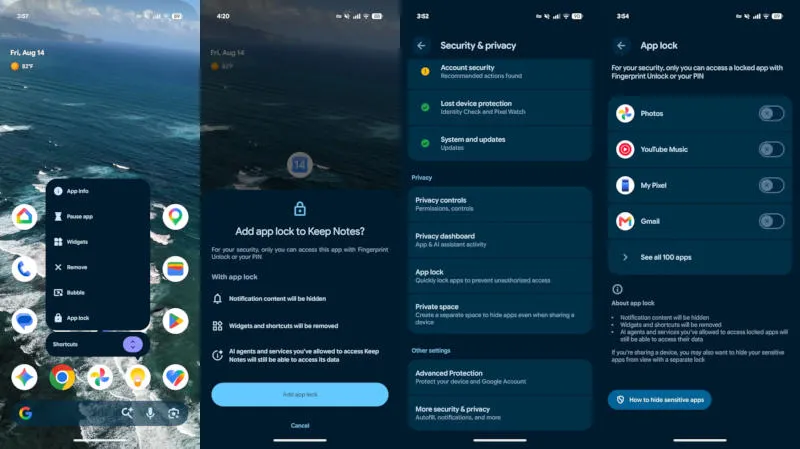
With the release of Apple iOS 18, iPhone users can block access to individual apps using a passcode or biometrics. Google is now testing a similar feature for Android, and it will likely debut on Pixel smartphones. This resource draws attention to 9 to 5 google.
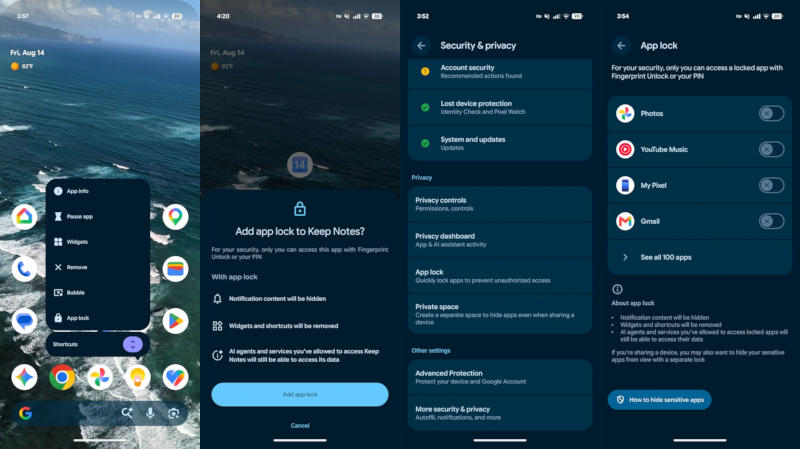
Image source: 9to5google.com
The App Lock feature appears in the Android 17 QPR2 Beta 3 preview version and is already available on Pixel devices where users are testing the software. The final version of Android 17 QPR2 for the masses may only be released in December. To access the app lock feature, you need to long press the app icon and select the appropriate option at the end of the list. With Settings Lock, users only need to enter a code or use biometrics to open the app. This feature works at the Android operating system level, so it supports blocking any application without third-party implementation.
Enabling app lock prevents locked apps from previewing content in notifications. Therefore, if you activate WhatsApp protection, messages in Messenger will remain hidden until the app is unlocked. There are additional privacy protections – content won’t show up on widgets and shortcuts associated with blocked apps. The only exceptions are agents and other artificial intelligence services, which will retain access to the data if the user has previously granted such permission.
A similar feature has appeared in the Samsung One UI 9.5 firmware beta based on Android 17. But in reality, the Korean manufacturer may need more time to roll out App Lock to a wider audience. Previously, Android introduced the Private Spaces feature, where you could place some installed apps so that others couldn’t access them. App Lock makes it easier to restrict access.
If you find an error, select it with your mouse and press CTRL+ENTER.