Apple has released the iOS 27 operating system. After the summer beta testing period, the update will be free for all users. It adds Siri AI, new Apple Intelligence features, enhanced Liquid Glass interface controls, and system improvements. 9to5Mac highlights the key features of the update.
Image source: Apple
You can download iOS 27 by going to iPhone: Settings → General → Software Update. Select Update to iOS 27 and follow the on-screen instructions. It is recommended that you use iCloud or a computer to back up iPhone data before installation. Apple also offers Step-by-step instructions for installing a new operating system.
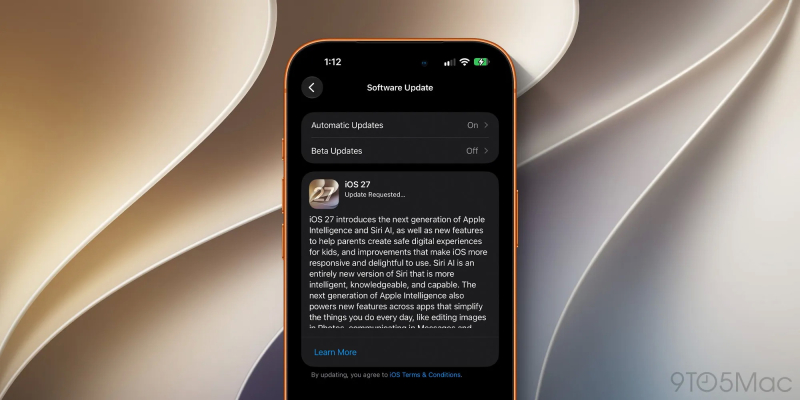
Image source is as follows: 9to5Mac
In iOS 27, Apple introduces a more advanced digital assistant for natural communication: Siri AI. The new Siri can use personal context to find information in messages, emails, photos and other content. It can also recognize information on the screen and support more operations in different applications. With the new Siri, you can ask clarifying questions or get help with what you’re seeing on your screen.

A separate Siri app lets you view your conversation history and continue it on other supported Apple devices. Additionally, Siri Mode in the Camera app adds visual intelligence to the viewfinder so you can get information about your surroundings. Use Siri Write to help you write and edit text. In messaging and mail apps, it adapts to the user’s writing style.
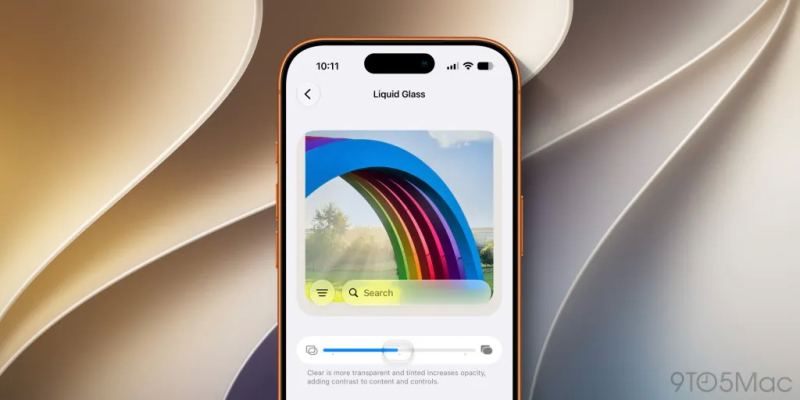
In iOS 27, a slider appears in Settings that allows you to adjust the transparency of the Liquid Glass interface – from completely transparent to completely darkened. Apple has also updated the design of app icons and the appearance of the system.
Special focus on performance. According to Apple, testing shows apps launch faster, recently taken photos load faster, and data transfer speeds are improved through AirDrop. Search enhancements are designed to make results more useful in Spotlight, Photos, and Mail.
On supported iPhone models, the Photos app now includes new editing tools:
- Spatial Reconstruction – Change the composition of a photo by virtually moving the camera.
- Expand – Expands an image beyond its original boundaries.
- Cleanup – Remove large objects and improve processing quality.
Safari also has the ability to automatically group tabs by theme. Additionally, Notify Me allows you to track changes on your web pages, such as price drops or stock availability.
Apple also announced a number of useful innovations:
- Individual equalizer settings for AirPods – adjust the sound to user preference.
- Separate volumes for alarms and timers – Set separate volume levels for these functions.
- Advanced parental controls include approving access to new websites (requesting views), setting app schedules, and managing screen time limits.
- Updated communication security features – extending protection to images and videos containing scenes of violence or cruelty.
- Contextual call information – Display important information (such as reservation numbers) when calling a supported company.
- Accessibility improvements – Expanded functionality for VoiceOver, Magnifier, Reading Mode, and Voice Control.
Siri AI and new Apple Intelligence features require iPhone 15 Pro, iPhone 15 Pro Max, and iPhone 16 series or later. Siri AI support is also included in iPhone Air and iPhone Duo models.
iOS 27 is natively supported on the following Apple smartphones:
- iPhone dual core;
- iPhone 18 Pro;
- iPhone 18 Pro Max;
- iPhone 17e;
- iPhone 17;
- iPhone 17 Pro;
- iPhone 17 Pro Max;
- iPhone Air;
- iPhone 16e;
- iPhone 16;
- iPhone 16 Plus;
- iPhone 16 Pro;
- iPhone 16 Pro Max;
- iPhone 15;
- iPhone 15 Plus;
- iPhone 15 Pro;
- iPhone 15 Pro Max;
- iPhone 14;
- iPhone 14 Plus;
- iPhone 14 Pro;
- iPhone 14 Pro Max;
- iPhone 13;
- iPhone 13 mini;
- iPhone 13 Pro;
- iPhone 13 Pro Max;
- iPhone 12;
- iPhone 12 mini;
- iPhone 12 Pro;
- iPhone 12 Pro Max;
- iPhone 11;
- iPhone 11 Pro;
- iPhone 11 Pro Max;
- iPhone SE (2nd generation and above).
If you find an error, select it with your mouse and press CTRL+ENTER.