The September update introduces a series of changes designed to make the user experience more functional and smoother. Here are the new features in Android 17 QPR1.
Android 17 QPR1 is a new update released by Google with a series of new features and changes designed to provide an improved experience. Don’t expect revolutionary changes, but small tweaks in the areas of customization, multitasking, and plenty of bug fixes. The update content is Available for Pixel devicesbut some new features are often part of the Android platform and may subsequently become available to users of different smartphones. Let’s specify The article is being updated We may have more information later.
News
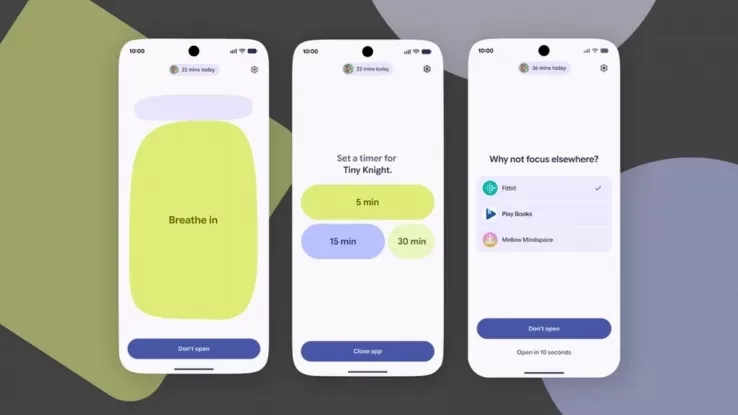
Let’s start with the Pause Point feature, which was announced at I/O and debuted on the Pixel 11. It is a tool designed to add pause point functionality. Wait briefly for 10 seconds Before opening apps that are classified as “distractions.” This way, you might have a few seconds before you actually start using the app. While you wait, the screen will offer some alternatives, either executing breathing exercisesview your favorite photos or maybe open another more useful app.
Now let’s get into the interface: Google has launched a Greater background blurspecifically regarding the power menu, volume panel, and application folders. And, it’s okay now Choose multiple screensavers instead of just oneand just swipe from the edge of the screen to go to the next one.
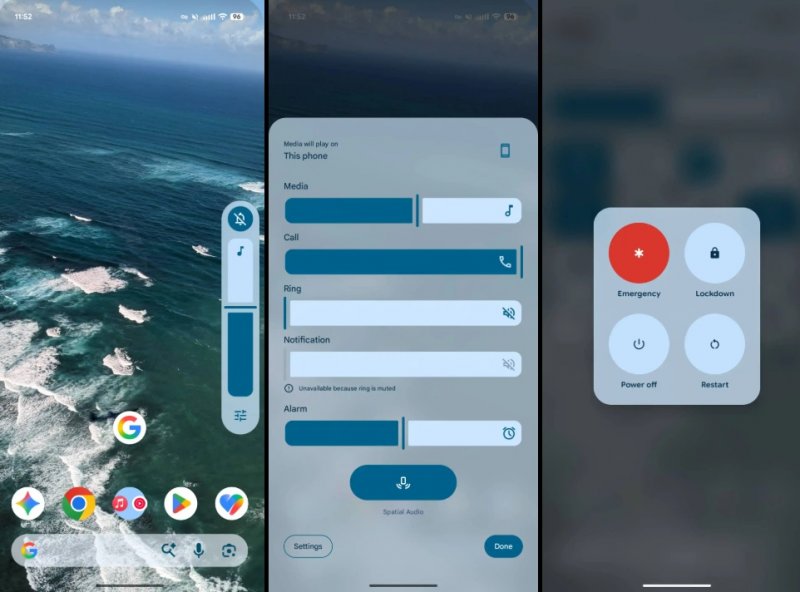
Finally, swiping down to access Quick Settings is now smoother. also, The gear icon has been redesigned settings.
multimedia control
this is a Summary Summary Key innovations related to multimedia control:
- Personalized vibration: Vibration type can now be selected for each ringtone. This way you can know who is calling you by vibrating your phone.
- Redesigned media carousel: The old pagination points and navigation arrows have been removed. You can now swipe between sessions, with part of the next tab revealed from the side.
- Screen recording: The default is to record the most recently opened application instead of the entire screen. You can return to full screen recording directly from the drop-down menu.
- location data: Photo picker can preserve location data because the app can ask for permission. This information has previously been deleted.
productive forces
Some of the new features also involve multitasking and apps. first, Recent apps directly replace apps suggested by the algorithmespecially on large screen devices. In this regard, Desktop mode has been improved You can now view full-screen, split-screen, and windowed mode shortcuts on your desktop. In addition, the picture-in-picture window can be freely moved to any position you want.
Bubbles now also support drag and drop, so you can Drag content from the app into the floating bubble and place them in the viewport below. In addition, the apps feature new APIs to communicate directly with compatible USB and Bluetooth devices and feature Better support for keyboards and other peripherals. Speaking of keyboards, management is now more flexible as the ball button for switching keyboards can be hidden.
Google expands fraud detection: Xiaomi could be the next to integrate anti-fraud protection
at last, Android operating system checkit checks the build number, Play Protect certification, and checks whether the version being used is official and, most importantly, safe. You can learn more about how Android OS Check works in our dedicated article.
How to get Android 17 QPR1
This version is Available for Pixel 6 and above. To install it, just go to Settings > System > System Updates and select Check for updates. this is a Normal OTA updateso there is no need to sign up for the Beta program. However, the program will continue to be in effect and will allow you to test new features and subsequent versions of Android in advance.