
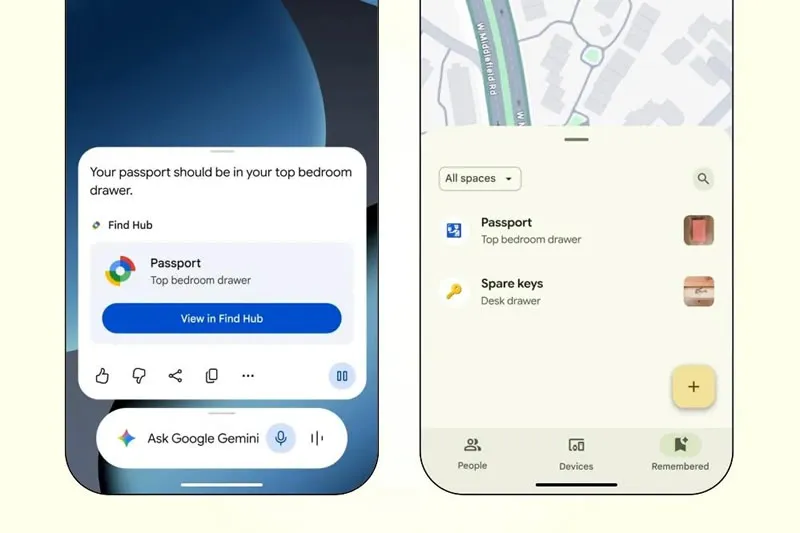
Google has announced expanded functionality for its Find Hub app, allowing you to find important things without using a physical tracker. Users will be able to ask Gemini to remember the location of an item and then retrieve this information through the Assistant or Find Hub.
Image source: Google
As Google said in its statement blogGemini will be able to remember the location of items that the owner of the device rarely uses, so there is a risk of forgetting exactly where he put them. To do this, just tell the assistant the location of an important document (such as a passport) and, if necessary, add a photo of it.
In a few months, there will be two ways to find the location of this item. Users will be able to ask Gemini directly about this, or open a tab containing content stored in Find Hub. This way, such items will no longer need to be connected to a separate Bluetooth tracker. This innovation will appear on devices running Android 16 and above, but only in countries where both Gemini and Find Hub are available.
In addition to the Find Hub extension, Google also launched the Guided Vision feature. It uses your smartphone’s camera and Gemini Live voice mode to help you interact with your surroundings. For example, the system will be able to read small text on labels or menus, and can also help you find specific products in your kitchen cupboards. If the camera is oriented incorrectly, the system will provide voice prompts. Guided Vision will be available on devices running Android 9 and above operating systems.
Another innovation is the Motion Assist feature, which is similar to Apple’s Motion Tips and is designed to reduce motion sickness when using a smartphone in a moving vehicle. This is accomplished by displaying dots on the screen that move in sync with the movement of the car or other vehicle.
These updates also affect Google Messages. The chat tool can now set a background image for chats, with the color automatically matching the design of the message. In addition, all participants in the conversation can now create and edit shared notes through the Google Keep service. In particular, this feature is useful for making a shopping list together or planning a trip. According to news edgenew features will be available as part of monthly Android updates.
If you find an error, select it with your mouse and press CTRL+ENTER.